Everything You Need to Know About PLC Batteries
Programmable Logic Controllers (PLCs) are rugged and lightweight computers used to automate industrial processes such as wastewater treatment plants, ore processing plants, and manufacturing plants assembly lines. They are designed to perform logical decisions for different electro-mechanical control applications and to operate reliably in harsh industrial environments like in extreme low or high temperatures, and dusty conditions. Also, PLCs are capable of automating an entire production line or a specific machine function, or a given process.
All Programmable Logic Controllers consist of four basic components. These components include the Processor section, an Input/Output(I/O) section, a programming section, and the power supply. The power supply provides the appropriate voltages levels required to power on the PLC and its internal components. It accomplishes this by converting a line voltage, mainly 120V or 240V AC (Alternating Current), into the required DC (Direct Current), normally 24V DC. The power supply comprises a step-down transformer that steps down the line voltage, and a rectifier that converts it to DC. The unit also has capacitors that filter the DC current, to ensure a constant supply of output voltage that is free of electrical noise and transient voltage spikes. While the primary source of power for the PLC and its components is the main power supply, the PLC also consists of a battery backup. In some PLC models, the main power supply unit charges the internal battery. The battery is connected directly to the PLC CPU board. This article provides a detailed description of the PLC batteries.
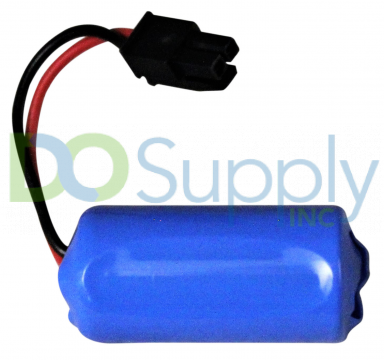
Why do you need a battery in your PLC? (What is its Purpose)
PLC configuration settings, Process set points, PLC logic, and Real-Time clock are stored in the EPROM (Erasable Programmable Read-Only Memory), and the battery powers the EPROM. The battery continues to power the EPROM, in case the PLC’s power supply is isolated for maintenance or when a power failure occurs. The reason why the PLC battery is also referred to as CMOS battery, backup battery, RTC battery, processor battery, or the RAM memory battery. Hence, we could say the PLC battery provides the power required to retain the contents of the processor’s non-volatile memory, in the event of a power outage or when the machine is switched off for maintenance or change of location.
If the PLC battery is a capacitor assembly, the current memory values will be automatically backed up if a power failure occurs. And when the power supply to the PLC is restored, the PLC returns operation mode with the program values and configuration that were present prior to the power loss. The battery capacitor assembly can typically back up the memory up to 72 hours after a power outage. But when the PLC has a lithium battery assembly, the memory data can be backed up safely for at most 5 years. Overall, the PLC battery is used to prevent loss of memory and the programmed software logic during power outages. Therefore, the PLC batteries should be checked and maintained regularly, to ensure that their voltages are within the recommended values.
Common Types of PLC Batteries
Normally, the PLC system uses Lithium-ion or Lithium batteries. Lithium-Thionyl Chloride batteries are the most common types of batteries used for PLC power backup. They are most preferred since they are highly suited for low current applications and they offer long service for the PLC battery. Also, the often-used voltage variants of the PLC batteries are 3.0 Volt DC and 3.6 VDC, though you can attain higher voltages by connecting multiple batteries in series. The two most common variants for PLC battery voltages are the 3.6V lithium PLC backup battery and the 3.0V lithium coin cell battery.
How long do PLC Batteries Last?
Some batteries that power the PLC processors are not rechargeable while others are rechargeable, according to whether the PLC is using a capacitor battery assembly or a Lithium battery assembly. The average Lithium-type PLC battery can have a service life of 2-5 years, depending on the type of processor used, the operating environmental conditions, and how much of the battery power is used. For instance, an on-board 3.0 VDC Lithium battery can provide backup to the PLC CPU during a power outage lasting several hours or days, after which its charge will be completely depleted.
What Factors affect the Service Life of the PLC Battery?
The lifespan of the PLC batteries can be affected negatively by the following factors:
- Frequent power outages
- High operating temperatures
- Powering off the system for long durations
- The age of the system
It is recommended that you replace the PLC battery after every 2 to 3 years, to avoid problems such as electrolyte leakage. Also, due to the negative effects, the aforementioned factors have on the lifespan of PLC batteries, you should also take into account the condition of your PLC system when scheduling a time to change the batteries.
What happens if a PLC battery dies?
As previously mentioned, the PLC programs that control the manufacturing processes or the machinery are most often stored in non-volatile or battery-backed memory. And a PLC system can continue to operate normally even with a faulty or drained battery, also, in such a case those programs will not be lost as long as the main power supply stays ON and does not go OFF.
However, when a power outage occurs or the power supply to the PLC is cut off and the battery is drained, the entire programmed software logic and PLC configuration settings will be wiped out. This leaves you looking for the program backups and the PLC system is likely to be out of service beyond the power outage. For this reason, it is recommended that you regularly check the voltage levels of the PLC battery and replace them before they fail or before their 5-year service life expires.
How do I change the battery in my PLC?
The onboard PLC battery in the CPU module should be periodically replaced, due to the reasons discussed in the previous section. The first thing you need to do is to determine whether your PLC battery is due for replacement by checking its status. There are diagnostics designed to detect the types of failures for the various components of the PLC system such as the CPU and I/O modules.
The CPU flags the non-critical errors as requiring attention. These errors do not prevent the CPU from going into Run Mode, nor can they cause it to change to Stop Mode from Run Mode. Also, PLCs have system tags within their application program that are used to detect the occurrence of non-critical errors. “Backup battery low voltage” is an example of a non-critical error. In such a scenario, the PLC system will provide a warning via a BATT LED located on the CPU module.
Usually, the battery (BATT) LED on the CPU flickers or turns yellow or red when the battery voltage is below the low voltage threshold, and when the battery is good (when its voltage is above the lower threshold) the BATT LED turns off. However, it is hardly possible to notice that the BATT LED is “ON” as in most cases this LED is locked in the controller’s drawer or cabinet Therefore, setting up a routine maintenance schedule to check the battery status is very essential.
A) PLC Battery Status Check
These steps are followed when you’re carrying out a routine battery status check:
- First, pull out the system controller cabinet or drawer from the exciter rack.
- To expose the CPU module, remove the cover of the system controller’s cabinet.
- Check for the presence of a red or yellow or flickering BATT LED alarm on the PLC CPU module.
- If the BATT alarm LED is “ON” (active), then proceed to replace your PLC battery.
Note: As previously mentioned the BATT LED alarm becomes active when the PLC battery voltage is below a low threshold; but the threshold values vary depending on the make or type of PLC battery used. For example, the lower than the threshold voltage for a Lithium-type battery with a rating of 3.0 VDC used in Allen-Bradley PLC-5 is approximately 2.0 VDC or 2.5 VDC. In this specific PLC-5, the BATT LED alarm first goes “ON” when the remaining battery back-up to power the processor (CPU) is 10 days’ worth, regardless of whether the CPU is powered or not.
B) Replacing the PLC Battery
When the PLC battery voltage is below a low threshold and the BATT LED is red, then you should consider replacing the battery. Also, the replacement can be done as a common preventative maintenance procedure or when the service life of the battery has expired.
Some PLCs require that the battery be replaced when the power supply is still ON, whereas for others you can plug out the PLC module from the machine and do the battery replacement. This depends on the make of the PLC and how the processor memory is backed up. It is therefore necessary to read the end-user manual supplied by the manufacturer of the PLC system, to understand how memory back-up is done and whether you’re required to retain power when replacing the battery or not to.
In most cases the PLC battery is replaced with the machine on, this means you won’t lose the programming logic and the PLC settings. For instance, the Allen-Bradley PLC-5 battery is replaced when PLC is still in operation and the power supply is ON. Other PLC systems can have multiple batteries, such as the FANUC CNC machines which have 4 Lithium-type PLC batteries for memory backup. In such a case you should follow the instructions for battery replacement provided in the FANUC CNC user manual, otherwise, the whole memory software will have to be reloaded. We have provided the general steps commonly followed when replacing the PLC battery:
Steps to Replace a PLC Battery:
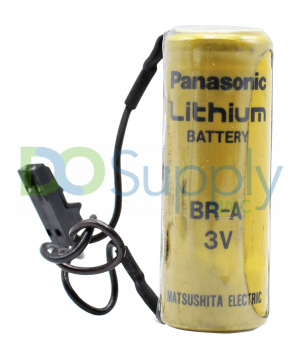
- First, locate the PLC battery on the CPU module. If the battery is in the front of the module and you can easily remove it and replace it, then you can leave the machine on and the PLC plugged in.
- Second, in case you cannot locate the battery without first removing the CPU module, then unplug the PLC power supply. This would mean that the PLC will need to be reconfigured and reprogrammed, though on the positive side the technician doing the replacement will avoid electrical shocks. But for the PLCs in which the battery is not required for program backup, like in cases where supercapacitors are used for memory backup, then you can unplug the PLC power supply without losing the program memory and PLC settings.
- Thirdly, press the retainer clips on the bottom and top of the CPU module to release the battery and slide it out. This step may not be needed if the battery is located in the front of the CPU (processor) module, as all you need to do is open the locked controller cabinet and carefully disconnect the battery connectors and remove it from the unit.
- Inspect the replacement PLC battery to ensure that it is identical to the original battery in terms of voltage and current rating, size, as well as compatibility with your PLC, make.
- Plug the new battery connectors into the specific socket, and using retaining clips secure the battery. Then, firmly fix the CPU module back into its chassis until the retainer clips engage and restore the power supply to the PLC system. But if the power supply was still plugged in as you replaced the battery and you had not removed the CPU module, then you don’t need to restore power. This is a case where the PLC battery is located in the front of the processor module.
- Lastly, be sure to properly dispose of the old PLC battery. To dispose of damaged Lithium-type PLC batteries or that which their electrolyte is leaking, it is recommended that you use two heat-sealed polyethylene bags with 1oz of Calcium Carbonate.
Note that the above general instructions and corresponding precautions are meant to guide you on how you can safely replace a backup battery for most PLC applications. However, if you are in doubt with any of these steps you should contact the manufacturer of the PLC system for clarity on your particular PLC battery and PLC model.
How to Test the Voltage on a PLC Battery?
Taking routine measurements of the voltages of the PLC batteries is very essential, as these voltages are to be maintained within the recommended values (above low threshold). Also, in some cases, you may have replaced an old PLC battery with a new one, but the BATT LED on the CPU module is still red or yellow although the program and configuration settings are still retained in the RAM. This would require you to test the voltage of the PLC battery, as part of the troubleshooting and diagnostic process. Digital Multimeters or Voltmeters are used to test the voltage on a PLC battery.
Digital Multimeters are mainly preferred over Voltmeters as they are multi-purpose instruments that include the same features as Voltmeters, and can also directly measure other parameters like current, frequency, resistance, and capacitance. They also display digital readings on an LCD or LED screen; thus, you can make much more accurate measurements. In addition, due to their higher resistance of 1 MΩ to 10 MΩ, they can measure voltage better. In this article, we consider using a digital Multimeter as a substitute for a digital Voltmeter to test the voltage of a PLC battery.
Steps to Test the Voltage of a PLC Battery with a Multimeter
- As in the case of battery replacement, first, locate the PLC battery on the CPU module and remove it. You may need to turn off the power supply if the battery cannot be removed without plugging out the processor module. Also, this step is not necessary if the battery you’re to test for voltage is new and has not yet been installed on the CPU module.
- On removing the battery, check its voltage on the provided battery label or its user manual if the label is not clear. As previously stated, the voltage rating variants of PLC batteries are 3.0 VDC and 3.6 VDC.
- Turn on your Multimeter and keep it on the DC Volt setting. This setting may be indicated with either DCV or just V followed by a straight line having 3 dots below it. In DC voltage (DCV), there will be several ranges like 2Mv, 2V,20V, 200V…etc. In such a case, keep the DCV setting on the Volt value above the actual voltage rating of your PLC battery. It is recommended you use a 5V, or 10V or 20V setting depending on your Multimeter make. Also, on your Multimeter you will note an indication of ACV or just V accompanied by a curved line, this means AC voltage. You should not use this setting on your Multimeter when testing the voltage of the PLC battery, as all batteries run on DC voltage.
- After setting the Multimeter, place the PLC battery such that its connectors are close to you or its terminals face you. Place the tip of the Multimeter’s red probe on the “+” terminal or on the red connector of the battery. Then place the tip of the Multimeter’s black probe on the “- “ terminal or on the black (or blue) connector of the battery.
- Keep the two probes in place as described in step 4, until you see a stable reading on the meter’s screen. Now, take note of the readings without interfering with the position of the probes.
If the meter reading is 3.0 or higher for a battery rated at 3.0 VDC, and 3.6V or 3.7V for a battery rated at 3.6 VDC; then your PLC battery is fully charged and still in excellent condition. Also, if the meter reads between 2.0V to 2.5V for the 3.0 VDC battery, or 2.4V to 2.9V for the 3.6 VDC battery, then your PLC battery is functional and can last a little longer. However, any reading below 2.0V for the 3.0 VDC battery and under 2.4V for the 3.6 VDC battery, then it is time for you to get a new battery for replacement purposes. As such readings indicate that the battery voltage is below the low threshold, and is not functional.
In conclusion, the PLC battery is an essential component of the PLC system as it provides backup power to the processor’s non-volatile memory. This prevents loss of programmed software logic and PLC configuration in the occurrence of a power outage. Therefore, routine maintenance procedures for the battery are highly recommended such as checking its voltage status through the BATT LED on the CPU module as well as routine testing of its voltage. These regular maintenance checks assist you to determine when the PLC battery is due for replacement, long before it gets drained. We hope that this overview of PLC batteries has been helpful in understanding the importance of PLC batteries. For more information or to discuss which PLC Power and Instrumentation solution might be best for your application, please visit our website here, or contact us at sales@dosupply.com or +1 (919) 205-4392.
DO Supply Inc. makes no representations as to the completeness, validity, correctness, suitability, or accuracy of any information on this website and will not be liable for any delays, omissions, or errors in this information or any losses, injuries, or damages arising from its display or use. All the information on this website is provided on an "as-is" basis. It is the reader's responsibility to verify their own facts.