20-HIM-A3 vs 20-HIM-A6
What is a HIM?
The term HIM stands for Human Interface Module. It’s basically a user interface that enables human operators to engage and interact with a drive, machine, or a system. HIMs are commonly used in the industrial context, and you’ll often come across them in industrial environments alongside AC drives or Variable Frequency Drives (VFDs). They allow factory operators to start and stop process cycles, adjust operating set points, and perform other necessary functions required to control and interact with industrial drives.
HIMs are also software-based, so they replace physical and hard-wired controls with software control parameters, allowing easier adjustment of drive operating parameters. Thus, with a HIM you can upload individual sets of parameters for your host drive and any other peripherals connected into the HIM.
Functions of a Human Interface Module
Other functions include:
- Accepting input data obtained from human operators
- Processing the input data
- Data logging
- Real-time information display of the operating conditions or status of a drive
Note: HIMs are designed and built as rugged interface devices that can maintain data integrity under extreme industrial environments.

20-HIM-A3 Overview
The 20-HIM-A3 is a basic Allen-Bradley Human Interface Module that is manufactured by Rockwell Automation, as part of the PowerFlex® 700 and PowerFlex® 7 product line. It includes an LCD screen that is coupled with a full-numeric operator interface keypad. This module can be used as a hand-held interface device or it can be locally mounted onto a compatible PowerFlex drive. For the drive mounting option, a panel bezel kit is provided.
Simply put, the 20-HIM-A3 is a Locally Drive Mounted or a Hand-held Human Interface Module (HIM) that features an LCD Screen and a Full-Numeric Keypad. It functions as a multi-purpose LCD operator interface that is designed to control an extensive range of inverter drives in the PowerFlex® series. Hence, it can be used with different Allen-Bradley PowerFlex® AC drives. 20-HIM-A3 HIMs are available in three revisions: Series A, Series B, and Series C.
Features and Benefits
- A Versatile Operator Interface Keypad for use with a wide range of PowerFlex® AC drives.
- SMART Start Functionality that makes drive programming and configuration faster and easier.
- A High-Performance Liquid Crystal Display (LCD) screen that shows the operating status and frequency of the HIM’s host drive. This makes troubleshooting the host drive much easier whenever an error occurs.
- Easy-to-read Displays on the LCD screen
- Jog Mode Functionality. With this mode, you can use the 20-HIM-A3 interface to manually drive motors as well as increase or decrease the speed of the host PowerFlex drive.
- CopyCat Functionality. The 20-HIM-A3 CopyCat functionality lets operators store parameter settings in the device’s memory, eliminating the need to configure those parameters every now and then. Thus, using this function, operators can upload individual parameter sets for the host PowerFlex AC drive and other peripherals connected to the 20-HIM-A3 module.
- Compact Dimensions that make it portable enough to be hand-held and ideal for small cabinet spaces.
- The 20-HIM-A3 module is available in IP20 drive mount and IP66 panel mount variants.
- A Waterproof Keypad. Its keypad is considered waterproof due to its ingress protection rating of IP66. This means that it’s dust resistant and it can withstand high-pressure water jets from every direction, making it well-suited for use in any humid or wet industrial environment.
20-HIM-A6 Overview
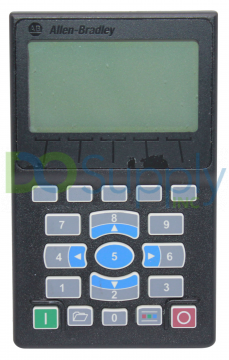
The 20-HIM-A6 is an enhanced Allen-Bradley NEMA Type 1 Human Interface Module that is either hand-held or locally mounted onto a PowerFlex® drive. It features a flashing LCD display screen and a Full-numeric keypad with fully-integrated navigation capabilities. The keypad also includes dynamic soft-keys. In essence, the 20-HIM-A6 is an Enhanced, Handheld or Drive Mounted, NEMA Type 1 HIM with a Full-Numeric Keypad and a Flashing LCD screen, as shown below:
Features and Benefits
The enhanced 20-HIM-A6 Human Interface Module provides the following features and benefits over the more basic 20-HIM-A3 module:
- A Newly Developed Flashing LCD Screen that provides improved visibility whenever alarms or drive faults are detected.
- A Full-Numeric Interface Keypad that’s enhanced with Fully-Integrated Navigation Capabilities. With this keypad, operators can easily configure the compatible PowerFlex® drives as well as the connected peripherals. To provide navigation functionality, the 20-HIM-A6 interface keypad includes five multi-function keys. These keys are blue in color, and they include key 2, key 4, key 5, key 6, and key 8. They are used to perform specific navigation functions including:
- Entering their respective numeric value
- Scrolling through menu structures or HIM screens
- Performing intended actions via corresponding functions shown in the HIM Data Area. The Data Area displays the drive functions or data that are currently being acted upon.
- Improved Keypad Tactile Feel and Better Touch Response that provides a more gratifying and error-free data input process to the operator.
- Increased HIM Operating Efficiency due to a provision of new menu structures and a more intuitive HIM access.
- Simplified Assignment of Custom Names to PowerFlex® drives and connected peripherals (i.e. Pump A). This reduces the required keypad presses.
- Support for Customary Asian and European Languages, in addition to the default support for the English language.
- Single-Function Keys that always perform only their dedicated function. The 20-HIM-A6 includes four such keys, namely:
- Start key, which starts the host drive.
- Folders key, which accesses folders for memory functions, parameters, preferences, diagnostics, and other tasks.
- Controls key, which accesses various control functions like jog mode, auto/manual, and direction functions.
- Stop key that stops the host drive and is also used to clear any fault. This key is active all the time and is controlled by the host drive parameter 307[Start/Stop Mode]
- Dynamic Soft Keys that change drive names or functions based on the present data entry mode or screen type. This helps simplify HIM operation and reduce the number of required keypad keys. Soft keys are situated at the top-most section of the 20-HIM-A6 keypad.
The name and function of a given soft key can change depending on the data entry mode in use or the type of screen that’s being displayed. So, whenever a dynamic soft key is active, its current function and corresponding label are indicated at the bottom part of the 20-HIM-A6 screen. Note, at most five HIM soft keys can be simultaneously active.
- Adjustable drive monitoring elements that can be displayed as a list of items on the HIM’s process screen or as individual status screens.
Note: To display the Process screen on a 20-HIM-A6 interface module, you’ll have to press the ESC soft-key found on the HIM’s Status screen. The Status screen is shown by default once the Human Interface Module is powered on. The Process screen displays various monitoring parameters of the host drive. At this point, the operator can change the displayed default drive monitoring parameters. Also, the user can select Single-line or Multi-line views of the Process screen by pressing the VIEW soft key on the HIM keypad.
In addition, the PowerFlex® 755T AC drive, which is compatible with the 20-HIM-A6 interface, does not fully support Process Display text.
Comparison between 20-HIM-A3 and 20-HIM-A6
Let’s look at the similarities and differences of the various features and functionalities of 20-HIM-A3 and 20-HIM-A6 human interface modules.
A) Compatible Drives
The Allen-Bradley 20-HIM-A3 Human Interface Module is designed for use with the following PowerFlex drive series from Rockwell Automation:
- PowerFlex® 7000
- PowerFlex® 70
- PowerFlex® 700
- PowerFlex® 700S
- PowerFlex® 700L
- PowerFlex® 753
- PowerFlex® 755
- PowerFlex® 755TR
- PowerFlex® 755TL
- PowerFlex® 700H
In most applications, the 20-HIM-A3 modules are used to provide a communication interface for configuring and monitoring PowerFlex® 755 and PowerFlex® 753 AC drives and their connected peripherals. These modules are also backward compatible and well-matched with the earlier versions of all PowerFlex® 7-Class drives, but with limited interface functionality
On the other hand, the 20-HIM-A6 Human Interface Module is compatible with the following Allen-Bradley PowerFlex® drive series:
- PowerFlex® 753 drives
- PowerFlex® 755 drives
- PowerFlex® 755TR drives
- PowerFlex® 755TL drives
- PowerFlex® 755TM drive system
- PowerFlex® 755TM drive system
- PowerFlex® 700 drives with vector or standard control
- PowerFlex® 70 drives with enhanced or standard control
- PowerFlex® 700H AC drives
- PowerFlex® 700S drives that include single-phase (Phase I) control or two-phase (Phase II) control
- PowerFlex® 700L drives with 700S standard control or 700 vector control
- PowerFlex® 700-Active Front End(AFE) drives
- PowerFlex® DC drives(Digital)
- PowerFlex® 7000 AC drives
- SMC-50 smart controllers for motors
- SMC™ Flex smart controllers for motors
B) HIM Communications
Both 20-HIM-A3 and 20-HIM-A6 interface modules include one (1) DPI (Drive Peripheral Interface) connector port. As they support Drive Peripheral Interface (DPI™) communication protocol with transmission speed/data rates of 125 Kbps (Kilobytes per second) or 500 Kbps.
C) Support for Multiple Languages
By default, the 20-HIM-A6 supports multiple languages including English, German, French, Dutch, Spanish, Italian, and Asian languages. Also, you can update the 20-HIM-A6 to support additional languages. Use the system administrator to download the HIM update. Similarly, multiple language support functionality can also be enabled in the same way in 20-HIM-A3 interface modules.
D) Ease of Drive Configuration and Monitoring
The Allen-Bradley 20-HIM-A3 includes a PowerFlex interface module that is engineered to function as a communication interface for monitoring and configuring different PowerFlex® AC drives. It also includes a full numeric keypad that is used to easily configure and monitor compatible Allen-Bradley PowerFlex® drives and connected peripheral devices.
In contrast, the 20-HIM-A6 features a full numeric keypad with fully-integrated navigation capabilities that allow easier and faster drive configuration as well as monitoring of compatible PowerFlex® drives and their peripherals. In addition to this, the 20-HIM-A6 is designed and built to provide users with an improved tactile feel and a better keypad touch response for a more ergonomic and error-free data input process. It also offers more intuitive HIM access and advanced new menu structures than the 20-HIM-A3 interface module, this increases its operating efficiency.
Moreover, the Allen-Bradley 20-HIM-A6 features a recently developed flashing LCD screen that provides enhanced visibility once an alarm or fault is detected within the host drive. This HIM also consists of dynamic soft keys for changing the drive’s name or functions as per the data displayed on the screen. Additionally, the 20-HIM-A6 includes modifiable drive monitoring elements that are displayed as a list of items on the HIM’s process screen or as individual status screens.
E) External Power Supply
Both interface modules, 20-HIM-A3 and 20-HIM-A6, do not require an external power supply. Instead, each of these HIMs is powered by the host PowerFlex® drive. The 20-HIM-A3 has a power consumption rating of 140 mA (current measure in milliamperes) at 12V DC (DC voltage); the same ratings also apply to the 20-HIM-A6 interface module.
F) Mounting Options
You can use both 20-HIM-A6 and 20-HIM-A3 as handheld Human-Interface devices or as locally mounted HIMs on a host PowerFlex® drive. A panel bezel kit is available with the 20-HIM-A3 for the drive mounting option.
Similarly, the drive mount 20-HIM-A6 version can be installed in a panel bezel kit. But it can also be installed in Drive Port 1, which is found on the front side of the host drive. The 20-HIM-A6 module can be installed into Drive Port 2, in order to support hand-held operations. This Drive Port 2 is normally located close to the bottom of the host drive’s control pod.
G) Regulatory Compliance
The Allen-Bradley 20-HIM-A3 Human Interface Module includes several certifications and is compliant with various industrial standards, including:
- UL (Underwriters’ Laboratory) certification
- c-UL-us Certification
- KC (Korea Certification) listing
- C-TICK mark
- CE (Conformité Européenne) certification
- RoHS (Restriction of Hazardous Substances) standards
On the other hand, the Allen-Bradley 20-HIM-A6 is available with the following certifications:
- UL certification specified as UL508C
- c-UL listing with specification CAN / CSA C22.2 No. 14-M91
- CE mark to indicate compliance with EN50178 and EN61800-3 requirements
- C-Tick mark for compliance with EN61800-3 standards
DO Supply Inc. makes no representations as to the completeness, validity, correctness, suitability, or accuracy of any information on this website and will not be liable for any delays, omissions, or errors in this information or any losses, injuries, or damages arising from its display or use. All the information on this website is provided on an "as-is" basis. It is the reader's responsibility to verify their own facts.