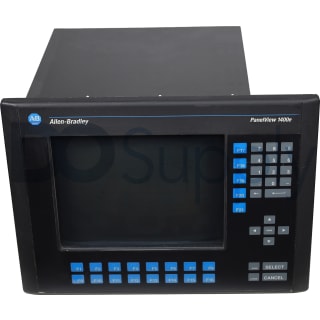
2711-T14C8X
The Panelview 1400 series includes the 2711-T14C8X, characterized by a display resolution of 800 x 600 pixels. This unit operates effectively within an ambient temperature range of 0 to 55°C. The term
The discontinued Allen Bradley PanelView Standard 1400 Graphic Terminals enable users to display, regulate, and observe application status data graphically. This panel-mount Terminal features a flash card for storing applications as well as many different port versions for varied communication options. These HMIs have a 14 in. monochrome flat-panel display. These terminals support simplified operator input, via touchscreen or via keypad and touchscreen, all operating on the easy-to-use PanelBuilder software.
Browse available units in our catalog of Panelview 1400.
The Panelview 1400 series includes the 2711-T14C8X, characterized by a display resolution of 800 x 600 pixels. This unit operates effectively within an ambient temperature range of 0 to 55°C. The term
The keypad replacement kit includes a full numeric keypad made from industrial-grade membrane material, ensuring durability in industrial settings. Weighing 0.5 lbs. (227 g), it features a simple snap
This memory upgrade kit, specifically designed for the PanelView 1400e, incorporates a 4 MB SIMM utilizing DRAM technology. The kit supports graphics at a resolution of 800 × 600 and includes features
This operator interface operates on an AC voltage supply ranging from 100 to 240 V. It can handle frequencies between 50 Hz and 60 Hz. Designed for durability, it functions effectively in environments
This operator terminal utilizes an LCD with various key operator functions. Its dimensions are 19 x 17 x 14 inches. The unit operates effectively in environments with ambient temperatures ranging from
This PanelView unit supports a 3-phase power input and contains 1008 Kbytes of flash memory. Communication is facilitated through ControlNet and an RS-232 printer port. The device operates effectively
This Allen Bradley operator interface has a 14-inch color TFT display with a resolution of 800x600. It operates within a voltage range of 85 to 264V AC and supports a frequency range of 43 to 63 Hz. T
Ideal for various environments, this HIM offers a protection class rating of IP20 and a NEMA 1 enclosure rating. It can withstand humidity levels between 5% to 95% without condensation. The 2711-T14C1
This antiglare overlay is specifically designed for compatibility with PanelView Standard 1400 touchscreen terminals. However, it is not suitable for keypad terminals. The device operates effectively
The 2711-T14C12 Allen Bradley 1400 Panelview Operator Terminal is a useful control panel featuring 200 VA max Power Consumption, 15 g Operating Shock, and 1008 Kbytes Total Application Flash Memory. I
PanelView 1400 Terminals belong to the Allen-Bradley PanelView Standard Operator Terminal series. The PanelView 1400 operator terminals have touchscreen and keypad options for initiating commands locally. Both versions feature the F1 to F21 function keys with support for custom legends and they also have numeric entry and cursor keys. Each touchscreen terminal has 384 touch cells on the screen. The display units of the PanelView 1400 terminals have monochrome, grayscale, and color variations with anti-glare protection, and adjustable brightness and contrast settings. Their communication options include the RS-232, DH+, DH-485, DeviceNet, Remote I/O, ControlNet, DF1, Ethernet, and EtherNet/IP networks.
The PanelView 1400 terminals are designed to visually communicate the status of an application and report fault conditions and errors. They directly connect to scanners or subscanners on a remote network through the Remote I/O port and each unit is equipped with an RS-232 port for file transfer and for printing message lists and alarm lists. A memory card slot is available for members of this series and they can be used with 256 KB, 2 MB, 4 MB, 10 MB, or 32 MB cards. Every PanelView 1400 terminal is designed to operate with custom applications created in the PanelBuilder software. They come with sealing gaskets to close off any spaces between the terminals and their enclosures. Each unit has 2 LED indicators for fault status and communication status updates. The configuration mode menu gives the operators access to the language options (French, Spanish, Italian, and German), the display and communication parameters, the date and time settings, and the printer parameters.
If your PanelView 1400 fails to startup properly, always check the power supply first. Ensure the terminal is receiving the correct voltage and that the wiring and connections to the power source are valid. In addition, you should also ensure the DC power positive and negative are attached to the proper terminals.
The status indicators are located on the back of your PanelView 1400 terminal. The COMM indicator is green and reflects communication. The FAULT indicator is red and reflects hardware faults. Upon startup, the fault indicator should be off and the comm indicator on. If the fault indicator flashes a few times at startup, this is not a concern. However, if both indicators are off you should check the power cable. See the table below to interpret the terminal's indicator status:
| Indicator | Status | Meaning |
| Comm | On | Normal Operation |
| Off |
Fault Present- Ensure controller is in run mode. Check baud settings of controller/terminal. Check for proper controller connections. |
|
| Blinking | Failed to establish communication | |
| Fault | On |
Fault Present - Restart terminal. If the error persists, the terminal requires servicing. Click here for information about DO Supply's repair service. |
| Off | Normal Operation | |
| Blinking | No applications loaded/application is corrupt. Reload the application. |
| Indicator | Status | Meaning |
| Comm | On | Normal operation |
| Off | Hardware failure | |
| Blinking | Failed to establish communication | |
| Fault | On | Hardware failure. |
| Off | Normal operation | |
| Blinking | Application not loaded/application is corrupt |
| Indicator | Status | Meaning |
| Comm | On | Normal operation |
| Off | Communication non-functional | |
| Blinking | Failed to establish communication, PLC may be in program mode | |
| Fault | On |
Fault Present - Check baud rate and rack settings. Ensure proper connections from terminal to controller. Verify remote I/O is enabled. |
| Off | Normal Operation | |
| Blinking | Application not loaded/application is corrupt |
| Issue | Possible Cause | Action |
| Failed Application Download (Initial Attempt) | Disconnected Communication Cable | Check cable type and connection |
| Improper Computer COM Port Selection | Ensure you have the correct COM port number in PanelBuilder32 or WinPFT software | |
| Communication Settings/Rate Incorrect | Ensure computer and terminal share the same communication settings | |
| Failed Application Download (Subsequent Attempts) | Communication Settings/Rate Incorrect | Ensure computer and terminal share the same communication settings. Adjust settings in the Communication Setup screen |
| Application File Name Appears as ******* | Invalid Application | Redownload application |
| Unusable Application Due to Error | Download new application | |
| Failed Application Transfer from Memory Card | Memory card incorrectly installed | Reinstall, verify its installed correctly |
| Application to Large for Terminal Memory | Reduce application size | |
| Incorrect Data Checksum | Ensure memory card is properly seated. It is possible the application may be corrupt | |
| File Format Invalid | Verify file format (.PVA) | |
| Failed Application Transfer to Memory Card | Memory card incorrectly installed | Reinstall, verify its installed correctly |
| Memory Card May be Wire Protected | Change memory card protection switch | |
| Another File on the Memory Card | Erase/reformat card | |
| Application to Large | Reduce application size, erase/reformat card | |
| Memory Card Format Invalid | Replace/reformat card | |
| Incorrect Data Checksum | Ensure card is installed correctly | |
| Application Does Not Exist | Ensure application exists |
Here at DO Supply, we offer repair services for your Allen-Bradley products, such as the Allen-Bradley PanelView 1400. For more information or to request a quote, click here.