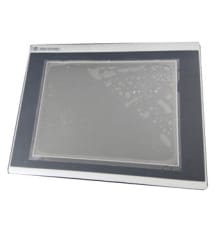
2711R-T7T
This interface terminal offers a vibrant display supporting 65,000 colors and features an LED backlight with a lifespan of at least 40,000 hours. It includes a real-time clock powered by a battery wit
The Allen Bradley Panelview 800 Graphic Terminals start with the part number 2711R and are panel-mounted display devices which offer both keypad or touch screen options for input by the operator. The Panelview 800 offers 800 MHz CPU processors,as well as high-resolution displays with LED backlight supporting over 65,000 colors.These graphic terminals are available in different display sizes from 4 to 10 inches. These operator interfaces also come equipped with dynamic memory and high flash memory. For communication they come with built-in Ethernet and serial communication ports, which allows them to support a wide range of networks and applications.
Browse available units in our catalog of Panelview 800.
This interface terminal offers a vibrant display supporting 65,000 colors and features an LED backlight with a lifespan of at least 40,000 hours. It includes a real-time clock powered by a battery wit
This HMI terminal operates within an input voltage range of 18 to 32 volts DC and includes a variety of communication ports. It features one each of USB host, USB device, RS-232, RS-422/RS-485, and Et
The 2711R-T4T operator terminal supports a power input of 24V DC and features both Ethernet and serial communication ports. The unit is equipped with a high-speed USB host port and includes capabiliti
This Panelview 800 adapter plate is constructed from metal with an industrial gray and black finish, designed to withstand various environments. Weighing 1.36 kg, it can be mounted onto panels and pro
This human-module interface includes an analog resistive touchscreen capable of enduring up to 1 million presses. It operates within a voltage range of 18 to 32 VDC and includes 256 MB of Flash memory
This adapter plate is specifically designed for 10-inch displays and panel mounting. It is constructed from durable metal and features a front protection rating of IP65 when used with the PV800. The i
This touchscreen interface boasts a display area of 211.2 x 158.4 mm and is equipped with 256 MB of DDR RAM. Communication capabilities include one RS-422 and RS-485 port, one RS-232 port, and Etherne
This terminal employs an analog resistive touchscreen that supports up to 1 million touch activations, complemented by a keypad featuring four function keys (F1 to F4). Integrated communication option
Designed and built by Allen-Bradley, the Panelview 800 series is a series of operator interface modules with 3 possible screen sizes. The Panelview 800 module display sizes can be 4, 7, or 10 inches wide. The units come with 800 MHz CPUs and high-resolution displays with LED backlights. The units are built with real-time clocks with the ability to record timestamps and to support critical data. The units feature the MicroSD™ technology for Datalog or recipe and file transfer. Designed with a Quick Lever panel mount, the Panelview 800 terminals feature fast installation with simple-to-use interfaces. The Panelview 800 units are Class 1 and Division 2 certified, and they meet worldwide standardizations for compatibility and safety features. The Panelview 800 units support landscape and portrait applications.
The Panelview 800 terminals feature the IP 65 NEMA 4X rated enclosures and they come with tactile keypads. The units support up to 65K colors in their graphics and they come with touchscreen compatibility. There are different ports that come with the units for supporting multiple communication. The Panelview 800 terminals feature built-in memory capacities of 128 to 256 MB. The Panelview 800 terminals feature fast boot-up times and they support screen switching. The units feature fast CPU processor speeds. These control terminals feature easy connections to the Micro800 and MicroLogix Controllers. The units come with USB host ports attached to the back of the terminals, and the RS-232 printer ports are attached to the back of the control terminals. The Panelview 800 terminals feature global certifications and they are built to support use in hazardous locations, providing support to a wide range of industrial applications.
If your PanelView 800 fails to startup properly, always check the power supply first. Inadequate power can cause a variety of unpredictable behavior. It is also good practice to determine whether there have been any changes since the last startup. Determine what these are to see if they can be reversed.
If you continue have start-up issues with your PanelView 800 terminal, observe the splash screen for state messages and for the status codes.
| Message | Code | State |
| POST Stuck Key | 31 | Fatal |
| POST Stuck Touch | 3A | Fatal |
| POST Failed RAM | 6C | Fatal |
| Message | Code | State |
| Write Firmware Image into Flash | A5 | Update |
| Complete/Successful Firmware Installation | OK | Update |
| Load Firmware Image into RAM | 1E | Update |
| Error - Firmware Write to Flash | A5 | Fatal |
| Verify Firmware Read-After-Write | D2 | Fatal |
| Missing/Invalid Firmware Image | 0A | Fatal |
| Failed Firmware Image Validation (CRC/Format) | 1E | Fatal |
| Failed Firmware Image Compatibility | 1F | Fatal |
| Message | Code | State |
| Operating System Initialize | I1 - J0 | Init |
| Application Registration and Initialize | N1 - N3 | Init |
| Application Load/Execute | N4 - N6 | Load |
| Operating System Startup | G0 | Boot |
| Boot Loader Connects to PC through a USB Device | 0A | AutoTest |
| Boot Loader Loads Firmware Image into RAM | E6 | AutoTest |
| Boot Loader Jumps to Operating System | FF | AutoTest |
Two indicators on the back of the PanelView 800 terminal help the operator identify operating issues. The Green Comm indicator reflects communication issues while the red Fault indicator reflects hardware faults. Upon starting the terminal the Fault indicator should remain off, but may initially flash a few times. The Comm indicator should be on. If neither indicator turns on, check the power cable.
The table below helps identify potential problems if the terminal fails during startup.
| Fault Indicator (Red) | Comm Indicator (Green) | Meaning/Action |
| Possibly Recoverable Errors | ||
| Blinking | On | Windows CE operating system firmware failed/missing. Reload firmware. |
| Blinking | EBC boot loader firmware either failed or missing. Reload firmware. | |
| Off | Most recent firmware download failure. Reload firmware. | |
| Fatal Errors | ||
| On | Off | Fatal hardware error, replace the terminal. |
Returning the terminal to the out-of-the-box condition can help the system recover from application misbehavior. This procedure will also restore your terminal if you have set terminal security and forgotten your password.
Here at DO Supply, we offer repair services for your Allen-Bradley products, such as the Allen-Bradley PanelView 800. Please click here for more information or to request a quote.