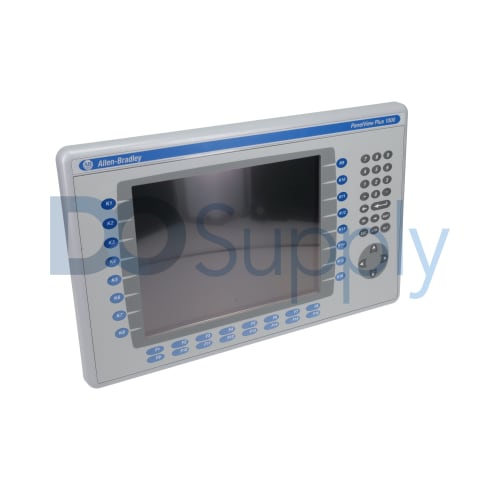
Product image is representative; revision or series may vary. Contact us to request a specific version.
2711P-RDB10C
The Allen Bradley 2711P-RDB10C is an Allen Bradley display module that is compatible with PanelView Plus and PanelView Plus 6 1000 Touch and keypad operated terminals.
-
We sell industrial automation parts backed by our free 2-Year DO Supply Warranty.
-
Same-day domestic and fast international shipping with UPS, FedEx, DHL, and more.
-
AMEX, Visa, MasterCard, Discover, wire transfer, net terms, and more.
-
Repairs and exchanges are available for all automation products.
- Reseller Options
Drop shipping, blind shipping, and account shipping with no extra fees.
Technical specifications for 2711P-RDB10C
| Manufacturer | Allen Bradley |
|---|---|
| Category | Panelviews |
| Product Line | Panelview Plus 1000 |
| Part Number | 2711P-RDB10C |
| UPC | 662073084532 |
| Weight | 5.38 lbs (2.44 kg) |
| Display Type | Color active matrix, thin-film transistor (TFT) with liquid crystal display (LCD) |
| Product Family | PanelView Plus Graphic Terminals |
| Description | Display Module |
| Compatibility | PanelView Plus 1000 / PanelView Plus 6 1000 |
| Display Size | 10.4 inches |
| Display Area | 211 x 158 mm (8.31 x 6.22) |
| Resolution | 211 x 158 mm (8.31 x 6.22) Resolution: 640 x 480 |
| Display colors | 18-bit color graphics |
| Anti-Glare overlay | not included |
| Luminance | 300 cd/m2 (Nits)(3) |
| Keypad | F1 to F16; K1 to K16; Numeric; Navigation |
| Touch Input | Analog Resistive; 1 Million actuations |
| Display Resolution | 640 x 480 |
| Input Type | Keypad/Touchscreen |
| Communication Ports | Ethernet, RS-232, USB |
| Input Voltage (DC) | 18...32 volts DC |
| Input Voltage (AC) | 85..264 volts AC |
| Enclosure Type | NEMA Type 12 |
| Marine Certified | No |
| Compatible Logic Modules | 2711P-RP1 through 2711P-RP9D |
The 2711P-RDB10C is an accessory item that is compatible with the PanelView Plus 1000 and PanelView Plus 6 1000 Operator terminals. This display module replaces the pre-installed display module that comes along with the mentioned operator terminals.
Display modules are replaced due to damage or when the expected operational lifespan of 50,000 hours is reached. This display module has a 10.4-inch Colored screen and comes with an embedded analog resistive touch screen interface and keypad.
The screen resolution of the 2711P-RDB10C is the same as the resolution supported by any PanelView Plus / Plus 6 1000 operator terminal which is 640 x 480 pixels.
After replacing the display module, ensure that the brightness of the operator terminal is properly set to a position where it can display the contents of the screen properly. Additionally, this display module may be calibrated using the calibration option found in the terminal settings. Screen calibration is done to ensure that the screen is operating properly. To initiate calibration, locate the Calibration setup found in the touch screen properties of the terminal. Respond accordingly to the prompts displayed in the screen. Typically, the calibration method requests the operator to touch Five (5) specific areas of the screen. The keypad assembly on the other hand does not require calibration.
The display module is the most used component of the operator terminal. Protect the display module by operating the device with a gloved finger and by regularly cleaning the surface with a soft cloth. Do not use corrosive substances when wiping the surface of the display module.
| Revision Part # | Also known as | |
|---|---|---|
| 2711P-RDB10C Ser A | 2711P-RDB10C/A, Series A, Rev A | |
| 2711P-RDB10C Ser B | 2711P-RDB10C/B, Series B, Rev B | |
| 2711P-RDB10C Ser C | 2711P-RDB10C/C, Series C, Rev C | |
| 2711P-RDB10CX | 2711P-RDB10C/X, Series X, Rev X | |
| Don't see your particular revision? now. | ||
- 2711P-RD810C
- 2711P-RDB1OC
- 2711P-RDBI0C
- 2711PRD810C
- 2711PRDB10C
- 2711PRDB1OC
- 2711PRDBI0C
- 271IP-RDB10C
- 271IPRDB10C
- 27I1P-RDB10C
- 27I1PRDB10C
- 27IIP-RD8IOC
- 27IIP-RDBI0C
- 27IIPRD8IOC
- 27IIPRDBI0C
Does the 2711P-RDB10C come with a warranty?
Yes, the 2711P-RDB10C includes a free 2-year DO Supply warranty. You can upgrade to a 3-year warranty at checkout for even more protection.
Is the backlight of a 2711P-RDB10C PanelView Plus 6 terminal replaceable?
Yes, 2711P-RDB10C does have a replaceable backlight. The replacement part number is 2711P-RL10C.
Do 2711P-RDB10C PanelView Plus 6 terminals have replaceable bezels?
Yes, 2711P-RDB10C does have a replaceable bezel. The replacement part number 2711P-RBB10.
What is the price of 2711P-RDB10C PanelView Plus 6 terminal?
Submit a quote request, send us an email, or call +1 (919) 205-4392 for our best price.
Does DO Supply offer repair services for the 2711P-RDB10C PanelView Plus 6 Model 1000 Display Module?
DO Supply offers repair services for a variety of Allen-Bradley products, such as the 2711P-RDB10C. For more information or to request a repair quote, please click here.
What are compatible operator terminals for the 2711P-RDB10C?
Compatible operator terminals for the 2711P-RDB10C are PanelView Plus 1000 and PanelView Plus 6 1000 Touch and Keypad operated, colored terminals.
Does this display module comes with an integrated anti-glare overlay?
No. Anti-glare overlays remains a separate component.
How many display module does a single operator terminal require?
Only One (1) display module is needed per operator terminal.
This Panelview Plus 1000 Display Module has a 10.4 in. Color Display and user input is done via Touchscreen/Keypad. This unit requires a compatible Panelview Plus logic module.