MVI46-GEC
The Prosoft Technology MVI46-GEC module is an industrial SLC 500 Ethernet module. It is compatible with Allen Bradley SLC processors. The MVI46-GEC module requires one slot in an Allen Bradley 1748 ch
The SLC 500 programmable controller series combines power with flexibility by offering a wide range of communication configurations, features, and memory options at an affordable price. The controllers utilize ladder-logic and structured-text programming to provide exceptional productivity and a smooth user interface. The broad selection of I/O modules, along with Ethernet, DH+, DH-485, ControlNet, and DeviceNet communication capabilities, makes SLC 500 controllers some of the most versatile on the market. Additionally, the SLC 500 series boasts an advanced instruction set, including file handling, sequencer, diagnostic, shift register, immediate I/O, and program control instructions. The modularity of the series offers many customization and configuration options, including but not limited to: adding I/O, memory, or communication interfaces. The SLC 500 modules even include backup options for increased fault tolerance via the ControlNet Hot Backup module or the PLC-5 Backup Communication module. If you are looking for a programmable controller that seamlessly combines power, flexibility, and affordability, then the SLC 500 series is for you.
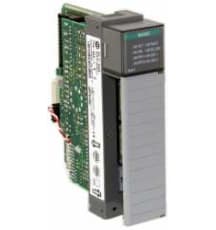
Browse available units in our catalog of SLC 500.
The Prosoft Technology MVI46-GEC module is an industrial SLC 500 Ethernet module. It is compatible with Allen Bradley SLC processors. The MVI46-GEC module requires one slot in an Allen Bradley 1748 ch
This master communication module supports a baud rate of up to 12 Mbps and draws 800 mA at 5 V from the backplane. Its operational temperature range starts from 0°C and goes up to 60°C, while it can b
This module operates effectively within temperatures ranging from 0 to 60 degrees Celsius and can withstand storage temperatures as low as -40 degrees and up to 85 degrees Celsius. It supports baud ra
The Spectrum Controls 1746sc-NO8I module is an analog current output module made for Allen Bradley SLC 500 systems. Eight analog current outputs are available on the 1746sc-NO8I module.
This communication module includes 2048 digital inputs and the same amount for digital outputs, with 1024 dedicated for trip or close actions. It supports 64 counters, along with 256 analog inputs and
This controller requires a current input of 2.25 Amperes at 5 Volts DC and features eight LED status indicators for local signaling. The module mounts in the left slot of the chassis, operating effect
Operating with a transmission speed that ranges from 9.6 kbps to a swift 12 Mbps, this module can handle 122 input data words. It draws 850 mA from the backplane at 5 VDC and delivers a maximum power
This module functions as a programmable unit that occupies one slot in the control system. It facilitates data transfer using ladder logic and incorporates an RJ45 connector for Ethernet connectivity.
This module supports individual input isolation, allowing for one point per common. It is rated for input frequencies between 47 Hz and 63 Hz. At 240 VAC, the nominal input current is 13.5 mA, while a
The 1746-N2B is a slot filler module designed for the SLC 500 series of Allen Bradley programmable logic controllers. This component serves to protect unused slots from environmental elements such as
The SLC 500 series is a series of Allen-Bradley programmable logic controllers that are used for a wide variety of applications. The SLC 500 series features Ladder-Logic with a structured text programming. The units are designed for addressing a broad range of applications that include file handling, sequencer, diagnostics, shift register, and immediate I/O and program control instruction applications. The SLC 500 controllers support built-in RS-232, 422, and 423 communication ports. The unit also comes with the DeviceNet and the ControlNet I/O on the selected processors. The SLC 500 series provides controllers that have powerful and affordable performance. These units are designed and built to provide excellent value.
The Allen-Bradley SLC 500 controllers feature modular processes, power supplies, I/O devices, memory options, and communication interfaces that allow the units to have configurable and expandable systems. The units feature an advanced instruction set that includes indirect addressing and a high level of performance capability for delivering computation instructions. The units are programmed to provide the users with a broad selection of the I/O devices. Therefore, the users can select from over 60 modules that help to control the discrete, analog, and temperature signals. The SLC 500 controllers are designed to deliver power and flexibility with a wide range of communication configurations. The SLC 500 modular hardware style controllers allow for the section of the processor, power supply, and I/O modules. The units also come with optional memory modules that provide a non-volatile memory in a convenient modular form. When using the commercial PROM programmers for programming and erasing the memory module, adapter sockets are required.
SLC 500 troubleshooting
Ensure the card is slid into the rack allowing both bottom and top clips to lock into place
Check that the entire rack has power
Allow a 1-5 min power cycle
Check pins on the back side of the card where a connection is made into the rack
Take the card out and do a visual inspection of the card outside of the rack, checking that resistors, capacitors, TRIACs and chips all look functional
Check to see that power supply is screwed into the rack and properly mounted
Make sure your RS-232 cable is making a good connection with both the computer and processor
Check that the proper COMM port and driver is being used in RS-Linx
For SLC 5/03 and up apply screwdriver across GND and VBB for 1 min, this will reset COMMS
Check to ensure you are reading the correct driver in rs-linx
Research error codes
Check power supply
Try inserting power supply into another rack
Check voltage going into power supply and ensure correct sumpers are selected if there any
Check pins on the back slide of the power supply that plug into the rack
Check manual for proper insulation and power requirements for multiple power supplies
Add your amperage rating for each device
If the rack is still not powering on, the application you are using could require more amperage than the supply is rated for
Example:
The 1747-L551 draws 1A at 5v DC
The 1746-OV16 requires 0.270 A according to documentation
The 1746-P2 supplies 5A at 5vDC to the backplane
Checking to see if our power supply can handle the load we would use the following formula:
IT=I1+I2+I3
Using this formula, we can see that since 1a + .27a = 1.27a ,
the 1746-P2 would handle this load no problem
If none of these solutions solve the problem, there could be a faulty card killing your whole rack
Remove each card one at a time to check if there is a card causing issues in the rack