PowerFlex 750 Adapter Card Selection Guide
PowerFlex 750-Series Drives
The PowerFlex 750-Series is a comprehensive class of AC drives, with a power range of 0.75kW(1Hp) to 1500kw(2000Hp), and 400/480V to 600/690V availability. Some of the PowerFlex 750 drives include PowerFlex 753 and PowerFlex 755 drives. These AC drives are used to control the speed of electrical devices like electric motors, so as to: ensure efficient energy generation, enhance process control, reduce energy consumption, minimize mechanical stress on motors used in control systems and optimize various industrial operations.
The latest PowerFlex 750-Series drives are designed to provide flexibility, ease of use, and high-speed performance. Generally, PowerFlex 750-Class drives have a wide range of industrial/global applications, but each type of PowerFlex 750 drive is limited to specific tasks.
Key Features of the PowerFlex 750-Series Drives
A) DeviceLogix™: An in-built control technology that supports PowerFlex drive control functions and manipulation of discrete outputs while using drive status information and discrete inputs onboard the drive.
B) Predictive Diagnostics: This feature allows you to carry out predictive diagnostics to prevent unplanned downtime, it also has a built-in protection gear. Such settings will enable you to keep track of information, which is likely to affect the lifespan of the PowerFlex 750 drive components such as relay outputs and cooling fans. Also, by using this feature, you can program your PowerFlex 750 drive to monitor the runtime hours for motor bearings or the entire machine.
C) Safe Speed Monitor, Safe Torque Off, and Integrated Safety: This feature will provide you with a choice for safety levels based on your application requirements. It helps protect equipment and personnel, all while preventing machine downtime with safety solutions that include Cat 3, Cat 4, and PLe/SIL.
D) Option Cards: Each PowerFlex 750 drive has a slot-based hardware architecture, which eliminates unnecessary add-ons by giving you the flexibility to customize your drive to suit your application and expand it for future needs. For instance, the PowerFlex 753 drives have an in-built I/O slot that can be expanded with option cards. Also, the PowerFlex 750-Series supports hardware control options, enabling you to reduce your spare parts and inventory requirements. In addition, there are readily available Option cards for additional digital Input/Output devices.
PowerFlex 753 AC Drive
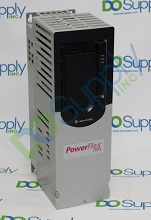
The PowerFlex 753 AC drive shown to the right, is ideal for general purpose industrial applications that require torque or speed control of up to 270kW/400Hp. Its specific uses include: Pump Off & Pump Jack control in Oil Well applications, as well as control of Plump & Traverse systems in the fiber industry.
The PowerFlex® 753 AC Drives by Rockwell Automation are equipped with built-in Input/Output options, which make them ideal for system integrators and machine builders who are looking to cut down engineering costs and to timely deliver more productive machines to their end-users. In the case of low-power applications and limited space availability, you can select a size-optimized PowerFlex 753 drive from Rockwell. Also, the current drives are equipped with a Dual-port EtherNet/IP™ Communication Module which provides cost-effective and flexible ways to leverage extensive EtherNet/IP networks. The PowerFlex 753 drive has three option slots for 24V power, communications, feedback, safety, or additional I/O devices.

PowerFlex 755 AC Drive
PowerFlex 755 AC drive, shown in the diagram to the left, is highly suited for applications that require positioning, torque, or speed control of up to 2000Hp/ 1500kW.
The Rockwell PowerFlex® 755 AC Drives include multiple hardware and control options, which make them well-suited for numerous motor control systems including conveyors, fans, and pumps used in Lifting, Oil Well and Fibers applications. PowerFlex® 755 AC Drives, have an embedded Dual-port EtherNet/IP™ Communication Module that supports linear, star, and ring topologies as well as a Device Level Ring functionality for high drive availability and fault-tolerant connectivity. Generally, a PowerFlex 755 drive has five option slots that support additional option cards for I/O, communications, feedback as well as 24V DC control power and is easily integrated with the built-in Ethernet port.
Network Communications
In this article, our PowerFlex 750 feature of interest is Network Communications, as the Adapter Card intended for installation in PowerFlex 750-Series Drives is used for network communication. The PowerFlex 750-Class Drives support a variety of communication network protocols, easing integration of the drives into your systems. For instance, the earlier version of PowerFlex 753 drives allows you to add an Ethernet with a communication module of your choice. While the PowerFlex 755 drive is enhanced with an embedded EtherNet/IP™ port, that enables you to readily manage the drive’s data over a series of EtherNet/IP networks. Also, the latest versions of PowerFlex 753/755 drives feature an embedded dual-port EtherNet/IP module, which provides cost-effective and flexible ways of applying EtherNet/IP, inclusive of ring and star functionality as well as Device Level Ring (DLR) topology.
However, most of the PowerFlex 750 Drives that are still in wide use today, are fitted with legacy communication adapter modules (20-COMM-xx) which require adapter cards. To support the use of adapter cards, PowerFlex 750-Series drives are designed to include a slot-based architecture, which allows customization of the drives with available option cards such as the adapter cards. The PowerFlex 755 AC drive is equipped with five option card slots and the PowerFlex 753 drive has 3 slots.
Types of PowerFlex 750 Adapter Cards
Essentially, an Adapter Card is a card that plugs into the front of the PowerFlex drive and sets up communication with the drive using a particular protocol. The adapter cards can be swapped depending on the use case. This article reviews three types of PowerFlex 750, 20-COMM-xx Adapter cards that are widely used with the PowerFlex 753/755 drives, and are currently available in the market. These cards enable legacy communication adapters(20-COMM-xx) to communicate with PowerFlex 750-Series Drives. They include:
A) 20-750-20COMM
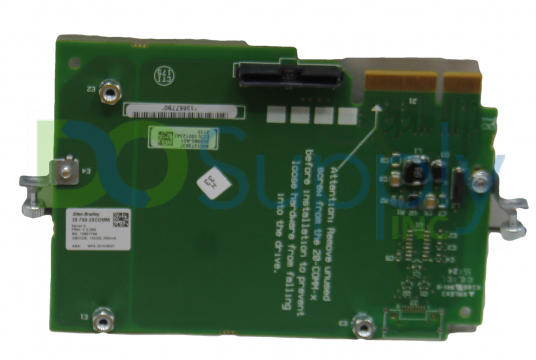
The Allen-Bradley 20-750-20COMM adapter card shown below is manufactured by Rockwell Automation. It enables obsolete and legacy 20-COMM adapters, of any supported protocol, to be used with PowerFlex 750-Series Drives; specifically, PowerFlex 755 and PowerFlex 753. This card can only be installed with Frames 2 and larger PowerFlex 750 drives.
Selection Guidelines
Compatible Communication Adapters: You can use the 20-750-20COMM adapter card with a variety of communication adapters including:
- 20-COMM-M v2.001 MODBUS TCP adapter that supports Modbus/TCP communication;
- 20-COMM-S RS485 DF1 communication adapter which enables RS-485 DF1 communication;
- 20-COMM-D adapter for DeviceNet communication;
- 20-COMM-C (Coax) communication adapter Versions v3.001 that enables ControlNet communication over coaxial cable;
- 20-COMM-K version v1.001 adapter which allows CANopen communication;
- 20-COMM-Q version v3.001 adapter which to supports ControlNet communication over fiber;
- 20-COMM-H RS-485 version v2.009 adapter that allows HVAC applications (however, with this adapter only the Modbus RTU can be used);
- 20-COMM-R adapter for Remote Input/Output communications;
- 20-COMM-L version v1.007 adapter that enables LonWorks communication;
- 20-COMM-P version v1.006 adapter which allows Profibus DP communication;
- 20-COMM-E adapter which enables Ethernet/IP communication.
The adapter version used determines whether the 20-750-20COMM adapter card can support Add-On Profiles and other languages besides English.
Communication Ports: For frame 2 and larger PowerFlex 750 drives, it is recommended that the Allen-Bradley 20-750-20COMM adapter card be installed in Port 6. This is because if the card is used on Port 4 or 5, it will make the adjacent left port inaccessible to other communication modules due to its larger size which could cover the entire slot. The installation of the card in Port 6 prevents interference with network cables connections, which could lead to communication disruptions in the drive.
The Access ports 0-6 are used for Input/Output connection, and implementation of explicit and implicit messaging; while Access port 7 and onwards are used for executing explicit messaging and Input/Output only. However, the compatibility of the 20-750-20COMM adapter card with these Access ports depends on the loaded firmware on the 20-COMM-xx adapter.
Mode of Operation: The 20-750-20COMM adapter card supports N2, P1, and RTU modes of operation.
Mounting Torque: This card requires a mounting torque ranging between 0.45N/m to 0.6N/m (4.0 to 6.0 lb/inch)
Storage Requirements: On purchasing the 20-750-20COMM adapter card, you should store it within a temperature range of -40oF to 158oF. Also, it is advisable that you avoid installing a PowerFlex 750 drive containing the card in hazardous environments that contain dust, corrosive or volatile vapors, or gas.
In most cases, the 20-750-20COMM card by Allen-Bradley is mainly used with Allen-Bradley PowerFlex 755-Class Drives. But it is also compatible with other brands of PowerFlex 750 modules which have a Frame 2 size or higher.
B) 20-750-20COMM-F1
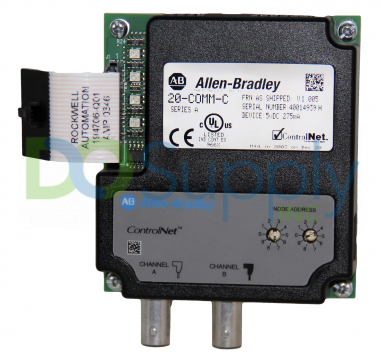
The 20-750-20COMM-F1 adapter card illustrated to the left is an Allen-Bradley brand manufactured by Rockwell Automation. It is essentially a PowerFlex 750, Frame 1, 20-COMM-xx communication card that supports several options of legacy communication adapter modules. However, it can only be used with Frame 1 PowerFlex 750-Class Drives. In this regard, it is important to note that for the Frame 1 PowerFlex 750 drives, the maximum recommended altitude while using the card is 2000 meters.
Features of the 20-750-20COMM-F1
Compatible Communication Adapters: The 20-750-20COMM-F1 card is compatible with several 20-COMM-xx adapters, namely: Remote I/O communication adapter (catalog number 20-COMM-R); ControlNet communication adapter (20-COMM-Q); RS-485 DF1 communication adapter (20-COMM-S); LonWorks communication adapter (20-COMM-L); Profibus DP adapter (20-COMM-P); DeviceNet communication adapter (20-COMM-D); Ethernet/IP communication adapter (20-COMM-E); Modbus/TCP adapter (20-COMM-M); HVAC communication adapter (20-COMM-H); ControlNet(Coax) communication adapter (20-COMM-C) and the CANopen communication adapter (20-COMM-K). The type of adapter used determines the communication protocol to be used with the 20-750-20COMM-F1 card.
Communication Port: You should install the 20-750-20COMM-F1 adapter card only on Port 4. Installing the adapter card in Port 6 or Port 5 can interfere with connections of your network cables and it will make Port 5 inaccessible to other communication modules.
When purchasing the Allen-Bradley 20-750-20COMM-F1 adapter card, you should ensure that an adapter plate with a catalog number: SK-R1-COMMPLT1-F1, is also included in the package. Alternatively, you can purchase the adapter plate separately and add it to the Allen-Bradley 20-750-20COMM card to create a 20-750-20COMM-F1 adapter card.
Storage Requirements: Once you have purchased the 20-750-20COMM-F1 adapter card, ensure that you store it within a temperature range of -40oC to 70oC. Also, for both operation and storage, a lot of care is needed to protect the PowerFlex 750 drive and its components such as the 20-750-20COMM-F1 adapter card, from corrosive elements that could impair its performance and ultimately cause damage.
C) 20-750-20COMM-ER Adapter Card
Depending on the type of 20-COMMS-xx adapter being used, the communication card can be designed to be adapter specific. One such example is the 20-750-20COMM ETHERNET adapter card, also known as 20-COMM-ER. The 20-750-20COMM-ER card is a Dual-port Ethernet/IP communication module that is compatible with PowerFlex 750-Series Drives (PowerFlex 753/755).
Components of the 20-750-20COMM-ER
The components include:
- Part 1-Status Indicators: The 20-750-20COMM-ER Adapter Card has four status indicators which show the status of the network connection, the DPI, and the adapter.
- Part 2-DPI Connector: This connector consists of a 20-pin shrouded male header that is single-row. An internal interface cable links this DPI connector to the drive’s connector.
- Part 3-Ethernet Connector: For the Ethernet network cable, an RJ-45 connector is required. You should ensure that the Ethernet connector is CAT-5 compliant, this will provide you with reliable data transmission on 100Base-TX Ethernet cables.
- Part 4-Web Pages Switch (SW2): This switch enables and disables the web pages of the adapter card. With 20-750-20COMM-ER the SW1 remains unused.
Features of the 20-750-20COMM-ER
The features of this Adapter Card include:
- Ensure that the status indicators of the card are visible when the PowerFlex drive cover is closed or open. These status indicators are important as they report the status of the adapter card, network, and drive communications.
- Be sure to check that the adapter card you’re considering is parameter configured for Input/Output (Logic Reference/Command and at least four pairs of Datalinks) to support application requirements. The card should also be able to support Explicit Messaging.
- The 20-750-20COMM-ER card should have a Peer-to-Peer or Master-Slave hierarchy which is configured to transmit data from and to either another PowerFlex drive or a controller on the network.
- This adapter card should be able to access PowerFlex 750 drives and its peripherals, which are connected on the same network as the adapter card.
- Before purchasing the 20-750-20COMM-ER, be sure to run user-defined fault actions that will allow you to determine how the adapter card and the connected PowerFlex 750 drives respond to Controllers in idle mode (referred to as Idle Flt Action), and Input/Output messaging communication interferences (Comm Flt Action).
- It should be possible for you to configure this card’s e-mail messaging to desired addresses, to notify you when selected drive faults occur or/and are cleared, and/ or when the adapter performs an idle or communication fault action.
- Also, you should be able to view the adapter card’s web pages using a web browser, which displays information about the adapter card, its connected host PowerFlex 750 drive as well as the DPI devices that are connected to the drive.
DPI External Comms Kit (20-XCOMM-DC-BASE)
When the 20-750-20COMM-ER card is used with a 20-COMM-E Series B adapter, it can be installed in a DPI External Comms Kit and mounted on a PowerFlex 750 drive. The adapter card can then be used with the kit’s Input/Output optional board. Normally, the adapter card is installed in the internal communication slot on the PowerFlex 750-Series Drives. But an externally-mounted adapter card may be required when:
- A second network is desired for data collection, and so on; but the PowerFlex 750 drive of interest is already connected to an existing network, like Remote Input/Output.
- The PowerFlex drive being used is remotely located to some Input/Output devices which also require to be added onto the network. The DPI External Comms Kit comes in handy for such an application because it has a general-purpose network I/O option slot that a controller can use. Hence, both the I/O devices and the PowerFlex drives can be handled as one node on the network thereby reducing node count.
| Series | DPI External Comms Kit (20-XCOMM-DC-BASE) | Optional I/O Board (20-XCOMM-IO-OPT1) |
| A | No | No |
| B | Yes | Yes |
DPI External Comms Kit Compatibility Requirements
Ensure that the 20-750-20COMM-ER adapter card you select has captive screws. The screws will enable you to secure and ground the card to the PowerFlex 750 drive or, to mount it on the metal enclosure in a DPI External Comms Kit.
This article has reviewed the selection guidelines for most of the commonly used Adapter Cards. There are still more adapter cards available in the market, that could be used with specific types of 20-COMM-xx communication modules. Like we could have an adapter card for DeviceNet(20-COMM-D) Adapter or a ControlNet(20-COMM-C) Communication Adapter. We hope that this overview of PowerFlew 750 Adapter Cards has been helpful in understanding design and specification options. For more information or to discuss which adapter card might be best for your application, please visit our website here, or contact us at sales@dosupply.com or +1 (919) 205-4392.
DO Supply Inc. makes no representations as to the completeness, validity, correctness, suitability, or accuracy of any information on this website and will not be liable for any delays, omissions, or errors in this information or any losses, injuries, or damages arising from its display or use. All the information on this website is provided on an "as-is" basis. It is the reader's responsibility to verify their own facts.