CPU vs Processor in PLCs: Why the Terminology Actually Matters
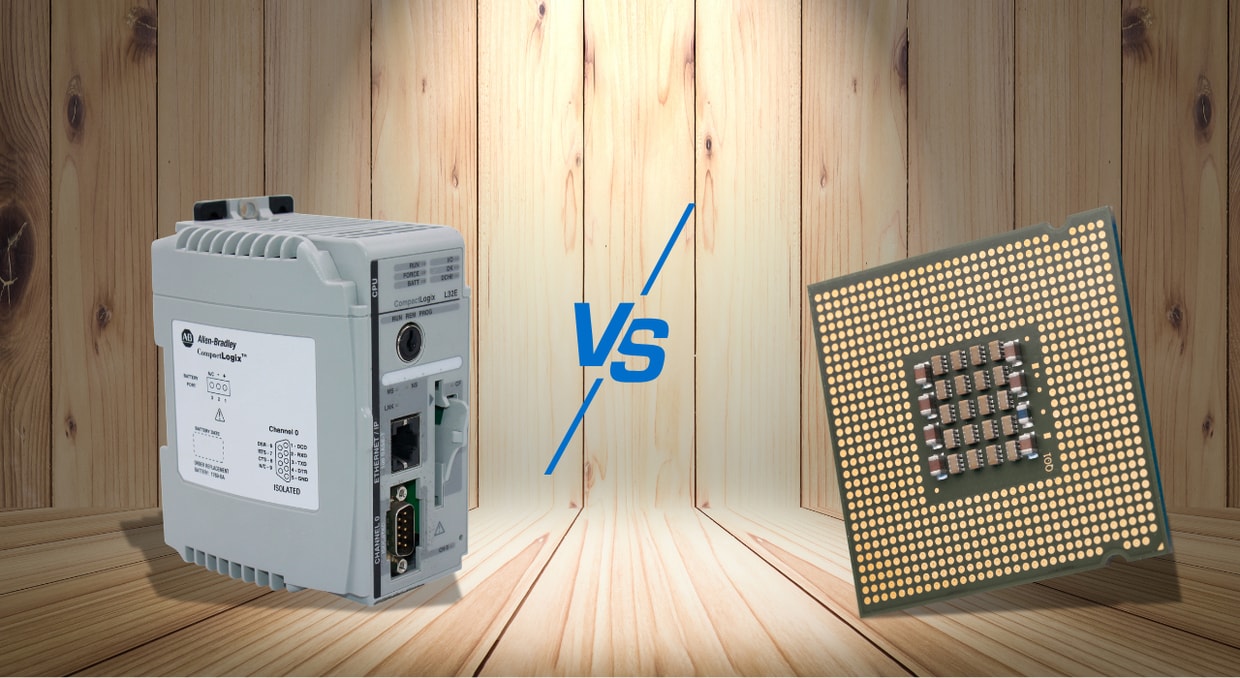
Accuracy in terminology is very critical in industrial automation. In deterministic control networks, where fault, sequence, and timing handling are verifiable and predictable, Programmable Logic controllers operate these systems. The fundamental system architecture may be obscured, as many engineers often use the processors and CPUs interchangeably. As contemporary PLCs evolve to feature visualization technologies, integrated safety, distributed intelligence, and multicore CPUs, the distinction is essential. Faults may occur in cybersecurity, task configuration, redundancy planning, system design, and procurement due to a misunderstanding of the distinction between CPU and processor.
This article explores the primary differences between CPUs and Processors. Featuring technical descriptions, architectural tasks, performance factors, maintenance implications, and future shifts in industrial control networks. Engineers can determine more precise design and functional decisions by simplifying these concepts.
Defining CPU vs Processor
Central Processing Unit (CPU)
The CPU is a customized control module tasked with comprehensive system monitoring and the deterministic execution of user-defined PLC programs. In modular PLC platforms, it is engineered as a removable module, and in Compact PLCs, it is designed as a built-in component. The CPU monitors system health, coordinates I/O modules, manages software and data memory, and supervises scan cycles.
PLC CPUs are tailored for predictable real-time functions, unlike general-purpose CPUs, which are optimized for raw processing speed. Through memory access arbitration, interrupt handling, and CPU-controlled task programming, deterministic behavior is executed. The CPU is critical for predictable system functionality and functions as the authoritative control unit. A proper understanding of CPU vs. processor empowers engineers to precisely validate, configure, and specify PLC platforms for industrial automation.
Processor
A processor is a computational hardware component that performs machine-level instructions. In PLCs, this comprises the microprocessor in the CPU, along with specialized processors elsewhere that handle safety, motion control, and communication. Motion processors manage servo control, interpolation, and axis synchronization. In contrast, communication processors control network protocols such as Modbus TCP, EtherNet/IP, and PROFINET. To ensure fail-safe functionality, safety processors run redundant logic pathways.
Processors do not independently establish reliable control behavior; though they offer execution capability, their functionality is orchestrated by the architecture, firmware, and the CPU. Misunderstanding CPU and Processor differences leads to false assumptions about system capacity, redundancy, and task scheduling. Identifying the processor as the computational machine and the CPU as the system control is essential for system design and communications within engineering teams.
| Attribute | Processor | CPU |
| Definition | Computational operational unit | Allocated PLC control module |
| Range | Specialized tasks and instruction-level execution | Memory diagnostics, I/O, logic execution |
| Hardware | Processing core or enclosed silicon chip | Integrated or modular PLC hardware |
| Terminology utilization | Hardware spec and module-level documentation | Engineering specs and PLC system manuals |
| Engineering Effect | Influences subsystem performance and unprocessed computational output | Scan performance and capabilities, and determine PLC class |
| Fault Effect | Specific or subsystem task faults | Extensive control loss if there are defects |
Why Terminology Matters
Procurement and Hardware Specification
The platform’s execution functionality, redundancy support, communication interfaces, I/O limits, and memory define the selection of a PLC CPU. These constraints cannot be described only by the processor specifications. A hardware component that performs well computationally but fails to meet safety or real-time requirements is the result of a misunderstanding of the component at the time of procurement. Supported communication protocols, expansion modules, scan cycle capability, and CPU class must be considered by engineers. The specifications’ precision also ensures an accurate selection of modules for safety integration, networking, and motion control, which depend on both the processor and CPU capabilities to function efficiently.
Programming and Configuration
PLC programming platforms distinguish processor-specific modules from CPU-managed functions. The CPU handles memory allocation, defines event-driven and cyclic tasks, and plans predictable logic execution. Processor modules offer specialized tasks such as safety monitoring, network communication, and motion control. Inefficient utilization of processor resources, memory allocation faults, and task misconfiguration result from misinterpretation of CPU vs Processor. Understanding the difference ensures compliance with timing requirements, modules interact with precision, and programs execute reliably. Engineers can improve resource allocation and task scheduling, prevent functional bottlenecks, and ensure safety and reliability in the Control System performance.
Troubleshooting and Maintenance
Precision in CPU vs processor terminology minimizes downtime and improves diagnostic effectiveness. CPU-level errors generally indicate memory corruption, watchdog timeouts, and logic execution faults. Processor-level errors include thermal degradation, motion subsystem failures, and communication faults. Distinguishing these error domains enables engineers to swiftly identify root causes, deploy accurate maintenance procedures, and apply the appropriate repair parts. Misinterpreting CPU vs processor may result in misdirected restoration efforts, leading to increased functional costs and prolonged downtime. For system lifecycle management, condition monitoring, and predictive maintenance, a clear understanding of CPU vs processor is critical.
Cybersecurity and Network Management
Contemporary PLCs often utilize numerous processors dedicated to security operations and system communications. The CPU incorporates these processors into the predictable control platforms. Interchangeably referring to processors and CPUs as equivalent can conceal network isolation requirements, vulnerability ownership, and patching responsibilities, escalating cybersecurity risk. Precise knowledge of CPU vs processor enables engineers to track processor-level communications for faults. To protect against digital attacks and maintain network integrity, it is critical to ensure that CPU-managed logic is separated from non-deterministic processor functions. Comprehensible terminology helps in compliance with mechanical security guidelines.
Deterministic Performance and Scan Cycle Integrity
Deterministic functionality is critical to PLC operation. The processor executes the instructions, whereas the CPU handles interrupts, controls the scan cycle, and enforces task execution order. If the CPU architecture of two PLCs with similar processor hardware varies, they can run differently. CPU-level orchestration enables coherent performance of event-driven, periodic, and cyclic tasks. A lack of clarity between CPU vs processor results in inaccurate assessments of real-time performance, system reliability, and task jitter. Precise apprehension enables task prioritization under different load conditions, reduces interrupt latency, and correctly validates scan times, supporting both safety guidelines and system performance.
Multicore and Multi-Processor Architectures in PLC Systems
To meet the computational requirements of enhanced diagnostics, industrial networking, and high-speed control, modern PLC systems increasingly deploy multi-processor and multicore designs. However, when many cores with corresponding logic execution are equated, it reveals a common misinterpretation of CPU vs processor architecture. The CPU represents the predictable control performance context handled by the real-time operating system and PLC firmware, while the processor is the physical gadget containing interconnects, caches, and multiple cores. Only chosen cores are bound to hard real-time functions, while others perform non-deterministic workloads.
Key architectural considerations include:
- Core distribution between communication, motion, and control tasks
- Priority inheritance, interrupt latency regulation, and RTOS-based scheduling
- Cache consistency and memory isolation to avert scan-time jitter
Supplementary processor cores do not enhance determinism without precise CPU-level integration. Engineers can precisely assess real-time operations, validate critical PLC applications, and ensure deterministic scan cycles with a clear understanding of CPU vs. processor distinctions.
Safety and Redundancy Architectures
Accurate processor vs CPU integration is a requirement of safety-critical PLC systems. Safety CPUs may execute redundant or diverse execution paths depending on the architecture. Certification, including SIL3 and SIL2, applies to the CPU as a unit rather than to discrete processors. CPU redundancy is not just processor-level redundancy; it must also include safety checks to ensure complete system determinism. Engineers must develop a redundant CPU framework, including execution domains, memory, and independent power, while processor-level components support specialized safety tasks. Misunderstanding CPU vs Processor can jeopardize operational dependability, safety operations, and system certification.
Soft PLCs and Virtualization
On standard processors, soft PLCs execute CPU logic as software-defined processes. Multiple virtual CPUs can share a single physical processor. Reproducible execution relies on CPU-level architecture, such as interrupt prioritization, task isolation, and core pinning. CPU logic integrates deterministic tasks while processors handle raw computation. Misunderstanding CPU vs processor leads to virtualized PLCs that appear useful but fail to guarantee timing. Engineers need to validate CPU task allocation, virtualization resource scheduling, and processor utilization to guarantee reliability in cloud-integrated or virtualized PLC systems. Grasping the differences between CPUs and processors is essential for system reliability, lifecycle management, and performance prediction.
Performance Benchmarking
In PLC performance evaluation, the distinction between the CPU vs processor is crucial. Processor features, such as the number of cores, cache size, or clock speed, do not ensure real-time performance. CPU-level components, including interrupt handling, task scheduling, and scan-cycle efficiency, dominate predictable behavior. Evaluation should focus on:
- Logic performance time
- Extreme case scan under heavy workload
- Interrupt latency and scheduling jitter
- CPU function switching, processing overhead
Misunderstandings of CPU vs. processor terminology can lead to misleading operational comparisons, resulting in system configuration errors or inaccurate platform selection.
Lifecycle and Obsolescence Management
PLCs are designed to continue operating reliably for decades. CPU firmware is periodically updated or supported over long lifecycles to enhance security, enhance diagnostics, and add more features, while processor hardware may remain static. Lifecycle operation must focus on correspondence with expansion modules, firmware accessibility, and CPU support. Confusing CPUs with processors can lead to faulty assumptions about component upgrade strategies, system longevity, or upgrade paths. Continued system reliability, deterministic obsolescence management, and proper lifecycle scheduling in long-term industrial installations result from the proper distinction of terminology.
Maintenance, Documentation, and Knowledge Transfer
Coherent CPU vs processor terminology ensures effective knowledge transfer and maintenance. Correct labeling in system diagrams, training materials, and manuals minimizes misinterpretation of errors, guarantees the proper replacement of modules, and simplifies onboarding of new operators. It aids in accurate predictive diagnostics and maintenance planning. Mislabeling of processors as CPU and vice versa can result in incorrect firmware application, prolonged downtime, or unnecessary troubleshooting. To guarantee long-term functional maintainability and efficiency, engineers should maintain training, prioritizing CPU vs processor distinction.
Future Trends in PLC Architecture
PLC architecture is gradually integrating cloud connectivity, AI diagnostics, and edge computing. CPUs integrate many specialized processors for analytic functions, safety, motion, and communication. Understanding the CPU vs processor distinction enables engineers to develop high-performance, scalable, and secure systems. Future platforms will gradually depend on distributed processor networks and software-defined CPU tasks. Grasping the differences between CPU and processor will enable engineers to leverage deterministic maintenance strategies, virtualized environments, and multicore architectures, ensuring system safety, reliability, and performance in complex automation ecosystems.
Practical Guidelines for CPU vs Processor Selection
When upgrading or designing a PLC system, engineers must carefully select CPUs and processors to ensure safety, reliability, and performance. Below is a summary of the practical guidelines:
- CPU Class and Scan Rate: Select a CPU that supports the needed memory requirements and function scan times for every control logic component.
- Processor Architecture: Assess processor efficiency in safety, motion, or communication modules, ensuring they meet operational requirements.
- Redundancy Requirements: Ascertain whether CPU redundancy is a necessity for platform certification compliance, as well as safe operation.
- Integration with Specialized Processors: Ensure that processors and CPUs for safety, motion, and communication are correctly orchestrated and compatible.
- Lifecycle and Upgrade Strategy: Evaluate long-term processor and CPU expansion options, firmware updates, and support to prevent obsolescence.
- Virtualization and Soft PLC Compatibility: Ensure processor allocation and CPU scheduling maintain predictable control.
Operators can make prudent decisions using these guidelines, which minimize operational risk and downtime while enhancing system efficiency.
Conclusion
The difference between CPU vs processor in PLCs is architectural, not semantic. The CPU is the primary control authority responsible for task scheduling, safety supervision, diagnostics, I/O coordination, and logic execution. The processor is the performance engine that executes computational functions under CPU orchestration, whether used as specialized modules or built into the CPU. Engineers who understand this difference make more precise decisions in lifecycle management, cybersecurity, troubleshooting, programming, configuration, and procurement. Now that we’ve covered the differences, if you would like to learn what the CPU does in a PLC, we have an article on that right here.
Come visit us at DO Supply and allow us to be your one-stop shop for PLC CPUs and accessories! We carry a wide range of PLC lines from companies you can trust, such as Allen-Bradley, GE, Omron, Mitsubishi, and more. We also offer repair services for automation equipment that needs a refresh or replacement. On top of that, all of our work and products are backed by our two-year warranty to keep your system running worry-free! As always, thank you for reading.
DO Supply Inc. makes no representations as to the completeness, validity, correctness, suitability, or accuracy of any information on this website and will not be liable for any delays, omissions, or errors in this information or any losses, injuries, or damages arising from its display or use. All the information on this website is provided on an "as-is" basis. It is the reader's responsibility to verify their own facts.