The Impact of Human-Machine Interfaces in Industrial Automation
Industrial automation is a harmonious symphony where each machine contributes to efficiency and productivity. The human-machine interface (HMI) is at the helm, the maestro directing this mechanical ensemble in real-time. HMIs are our windows into the automated world, translating cryptic machine language into a dialogue we can engage with.
The charm of HMI lies in its ability to keep the human element central, even in highly automated settings. Beyond mere operational control, it ventures into safety, data analytics, and adapting to evolving technologies. As we move forward, we’ll uncover the myriad ways HMIs have become indispensable in the story of industrial automation, making it a tale of innovation and human ingenuity.
Historical Background
Industrial automation has come a long way since the days of manual control. In the early stages, operators were greeted with basic control panels adorned with push buttons, lights, dial and panel gauges, and first-out annunciators. These were the primitive forms of HMIs that allowed for basic interaction between humans and machines. As the need for more sophisticated control and monitoring grew, so did the features on these panels.
Transitioning from the rudimentary control panels, the industry witnessed the advent of hardwired devices, which eventually evolved into electronic panels. These early stages of evolution paved the way for more complex interfaces, setting the stage for the arrival of personal computers and software programs in the HMI scene.
In the early years, CRT (Cathode Ray Tube) monitors with monochromatic screens and text-based displays dominated the landscape. Interaction with machines was primarily through mechanical buttons, a keyboard, or a mouse. The terminals were simple add-on components to machines, augmenting operations and providing control. However, the systems weren’t user-friendly and required programming to achieve any form of visualization1.
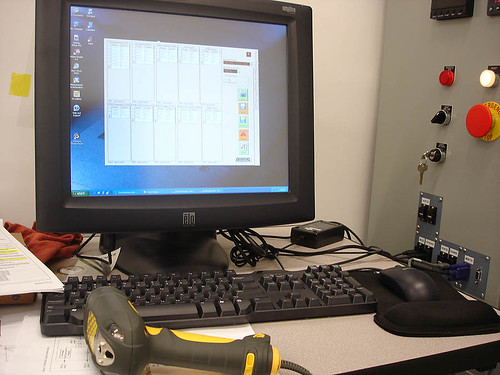
The real game-changer came in the late 1990s with the introduction of control software for PCs by companies like Wonderware and Intellution. During this period, we also witnessed a hardware evolution with the transition from CRTs to LCDs and the introduction of intrinsically safe touchscreens. This shift marked a move from hardware-centric HMIs to software-centric systems, significantly enhancing the capabilities of HMIs and making them more intuitive and user-friendly.
Entering the early 2000s, HMIs were developed to operate in hazardous areas, and touchscreens rapidly gained popularity in industrial technology due to their ease of use. This period also shifted focus to HMI software and PC hardware, reducing dependency on keyboards and mice.
The continuous evolution of HMIs has been fueled by technological advancements, embracing color displays, multi-touch functionalities, and even voice recognition, making human-machine interaction more intuitive and effective. With each leap, HMIs transitioned from mere operational interfaces to robust tools capable of data analytics, ensuring safety, and seamlessly integrating with evolving technologies.
This journey from simple buttons to sophisticated, interactive HMIs has made industrial processes more efficient and aligned with human needs and capabilities.
Enhancing Operational Efficiency
The arrival of HMIs on the industrial stage wasn’t just a technological advancement; it was akin to gaining a new sensory organ, a window into the inner workings of machines and processes. With HMIs, the industrial scene transitioned from just doing to observing, analyzing, and improving.
Real-time Monitoring and Control:
The core beauty of HMIs lies in their ability to provide real-time insights. By visualizing the data on the go, operators can monitor the health and performance of machines, ensuring they are performing optimally. This real-time feedback loop allows for immediate adjustments, ensuring the industrial process stays on track.
Data Visualization:
HMI has turned the cryptic machine data into stories. Through graphical representations, they unveil the trends and patterns in machine performance, making it easier for operators to make informed decisions. Operators no longer need to sift through heaps of raw data; a glance at the HMI screen paints a clear picture.
Improved Troubleshooting:
When things go south, HMIs are the compass that helps navigate the storm. They provide diagnostic information that helps pinpoint where the issue lies, significantly reducing the time spent troubleshooting. This prompt identification of issues minimizes downtime, keeping the production rhythm in tune.
Enhanced Safety
The emphasis on safety in industrial automation has never been more pronounced. With the advancement of HMIs, achieving enhanced safety alongside operational efficiency has become a tangible reality. Leading players in the industry, like Mitsubishi and Allen-Bradley, have made significant strides in integrating robust safety features into their HMI products. These features comply with international safety standards and provide a conducive environment for operators, minimizing risks and paving the way for a safer, more productive industrial setup. Let’s explore some of these safety enhancements and how they translate into real-world applications:
Mitsubishi:
iQ-R Integrated Safety Solution:
- The iQ-R Integrated Safety solution is designed to provide functionally safe machines by integrating safety features directly within the control platform.
- Compliance with International Safety Standards: This solution complies with IEC 61508 SIL3 and ISO 13849-1 PLe safety standards, ensuring it meets global safety requirements.
- Unified Platform: It provides a unified platform for executing standard and safety programs, simplifying design and commissioning processes for Original Equipment Manufacturers (OEMs).
MELSEC-QS Safety Programmable Controller:
- Designed for safety control, this controller can connect to emergency stop switches, light curtains, and other safety devices.
- Compliance with International Safety Standards: It adheres to EN954-1 Category 4, ISO13849-1 PL e, and IEC61508 SIL 3 safety standards.
- Safety Output Control: It can shut off the power of hazardous sources, like robots, according to user programs, ensuring a safer operational environment.
Additional Safety Controllers and Modules:
Mitsubishi offers other safety controllers and modules like the MELSEC-WS and safety relay module, complying with various safety standards and providing basic to advanced safety functionalities.
Allen-Bradley:
Safety Input/Output (I/O) Modules:
- Allen-Bradley’s safety I/O portfolio offers local, distributed, and On-Machine™ options.
- These modules help improve compliance and machine performance, providing a flexible solution to meet different safety requirements and system configurations.
PanelView 800 Touch Screen HMI:
- While specific safety features are not detailed, the product documentation includes information on legislation and compliance, indicating a commitment to adhering to safety standards and password protection.
Holistic Safety Approach:
- Allen-Bradley’s HMI products are part of a broader portfolio that addresses productivity, innovation, and global needs, indicating a holistic approach to ensuring operational safety and compliance.
These features underscore the emphasis both Mitsubishi and Allen-Bradley place on safety and compliance in their HMI products, ensuring that industrial operations are efficient, secure, and compliant with international safety standards.
Cost Reduction
Who doesn’t love saving a penny or two? Especially in the industrial arena, where every dime counts. The good news is introducing HMIs into the mix isn’t just about fancy tech upgrades; it’s also about keeping the balance sheets optimized. By keeping a sharp eye on energy consumption, dialing down maintenance costs, and minimizing material wastage, HMIs are the unsung heroes in the cost-saving saga.
Decreased Operational Costs:
- Energy Efficiency: Modern HMIs enable monitoring and controlling energy consumption, allowing for optimizations that reduce energy bills.
- Maintenance Costs: HMIs can help prevent costly breakdowns and extend machinery life by providing real-time diagnostics and predictive maintenance alerts.
- Material Waste Reduction: HMIs facilitate precise control over processes, minimizing material wastage and ensuring optimal utilization of resources.
Lower Training Costs:
- Intuitive Interfaces: HMIs with intuitive interfaces require less training time, enabling operators to become proficient quickly.
- Interactive Training Modules: Some HMIs offer built-in training modules, reducing the need for external training resources and accelerating the learning curve.
Scalable Solutions:
- Adaptability: HMIs can adapt to evolving operational needs without requiring a complete system overhaul, thus saving costs associated with hardware upgrades and new installations.
- Software Upgrades: Modern HMIs allow for software upgrades that can enhance functionality and extend the system’s lifecycle, offering a cost-effective way to keep pace with technological advancements.
Reduced Downtime:
- Prompt Troubleshooting: HMIs provide crucial diagnostic information that speeds up troubleshooting, reducing downtime and associated costs.
Investing in advanced HMI technology can significantly contribute to cost savings, making operations more efficient and economically sustainable.
Scalability and Future-Proofing
In the fast-evolving world of industrial automation, staying a step ahead is crucial. HMI plays a pivotal role in ensuring that operations are scalable and prepared for technological advancements.
Scalable Solutions:
- Modular Design: Modern HMIs often come with a modular design, allowing for easy expansion as operational needs grow.
- Integration Capabilities: HMIs can seamlessly integrate with new technologies and systems, enabling a scalable solution that grows with the business.
Future-Proofing:
- Software Upgradability: The ability to upgrade software on HMIs ensures that systems remain current with the latest features and security updates without needing a complete hardware overhaul.
- Adaptability to Emerging Technologies: HMIs are increasingly designed to interact with emerging technologies like Augmented Reality (AR) and Virtual Reality (VR), setting the stage for more interactive and immersive industrial control systems.
Continuous Innovation:
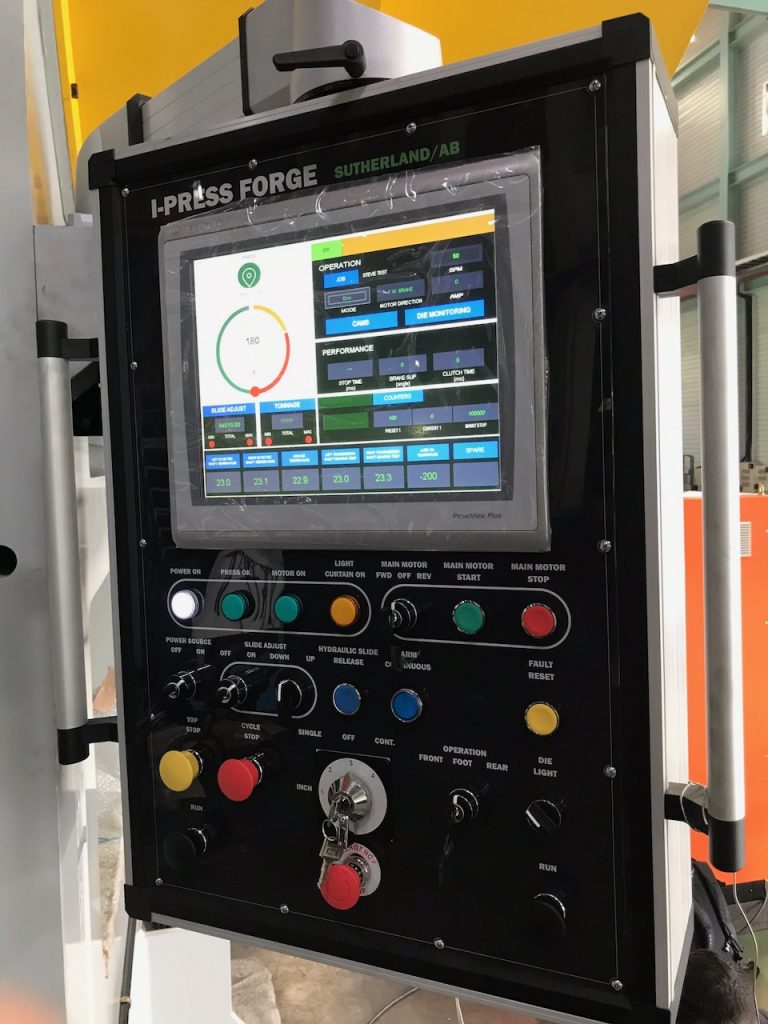
- Open Platforms: Some HMIs offer open platforms allowing custom application development, enabling innovation and adaptation to new operational challenges.
Data Analytics and Predictive Maintenance:
- Preemptive Measures: HMIs equipped with data analytics and predictive maintenance capabilities enable preemptive measures, identifying potential issues before they escalate, thus saving costs and ensuring readiness for the future.
HMIs are a bridge to the future, ensuring that industrial operations remain competitive, scalable, and prepared for what’s next in automation technology.
Challenges and Considerations
Implementing HMIs in industrial automation significantly bridges the gap between humans and the automated system, enhancing control, monitoring, and troubleshooting capabilities. However, the journey from selecting to successfully implementing an HMI solution comes with challenges and considerations. These range from the ease of setup and software usability to integration with other systems and compliance with safety standards. By addressing these considerations, organizations can ensure a smooth HMI implementation, ultimately leading to a more efficient and compliant operational environment. Below is a more detailed breakdown of these challenges and considerations, illustrated with examples from prominent HMI platforms:
Ease of Setup and Project Creation:
- Different HMI platforms offer varied ease of setup. For instance, platforms like Mitsubishi’s GT Designer 3 provide a “New Project Wizard” to guide users through the initial setup.
Software Usability:
- The user interface and design tools play a crucial role. For example, Allen-Bradley’s software offers a consistent interface across its HMI solutions, aiding in ease of use and lessening the learning curve.
Integration with Other Systems:
- Effective integration with other systems like PLCs and DCS is vital. Some HMI platforms offer seamless integration with popular PLC brands, enabling smoother communication and data exchange between systems.
Customization and Scalability:
- HMIs with customizable interfaces and scalable solutions can adapt to evolving operational needs. For instance, modern HMIs offer modular designs, allowing for easy expansion and software upgradability.
Vendor Support and Training:
- Adequate vendor support is crucial for troubleshooting and smooth operation. Leading brands often provide extensive training resources, documentation, and technical support to assist users.
Cost:
- The total cost of ownership includes the initial investment, maintenance costs, and potential upgrades. It’s essential to evaluate all cost factors before making a decision.
Troubleshooting and Maintenance:
- Timely troubleshooting is crucial to minimize downtime. Modern HMIs often come with built-in diagnostic tools and alarms to alert operators about potential issues and help in prompt troubleshooting.
Compliance and Safety:
- Ensuring compliance with industry standards and safety regulations is paramount. Modern HMIs have features like data logging, traceability, and customizable safety settings to aid in compliance.
Adaptability to Emerging Technologies:
- The ability to integrate with emerging technologies like AR and VR can future-proof the automation system. For instance, some advanced HMIs now offer AR integration for enhanced visualization and interaction.
Final Thoughts
Human Machine Interfaces is a cornerstone in industrial automation, bridging the chasm between human operators and automated systems. They enhance operational efficiency and play a pivotal role in ensuring safety, compliance, and cost reduction. The journey from the rudimentary button-based interfaces to today’s sophisticated touch-screen and gesture-based HMIs showcases the relentless stride of innovation in this domain.
However, the implementation of HMIs is not without its challenges. Several considerations warrant attention to ensure a successful HMI implementation, from the initial setup and software usability to integration with other systems and compliance with safety standards. By addressing these challenges head-on and leveraging the advanced features and capabilities of modern HMIs, industries can significantly bolster their operational efficiency, safety, and readiness for future technological advancements.
As HMIs continue to evolve, embracing new technologies like Augmented Reality and Virtual Reality, they promise to redefine the human-machine interaction landscape further. The future holds possibilities, with HMIs at the helm steering the industrial automation ship toward uncharted territories of efficiency and innovation.
DO Supply Inc. makes no representations as to the completeness, validity, correctness, suitability, or accuracy of any information on this website and will not be liable for any delays, omissions, or errors in this information or any losses, injuries, or damages arising from its display or use. All the information on this website is provided on an "as-is" basis. It is the reader's responsibility to verify their own facts.